Stock valuation and cost control
1. Definitions
1.1. Stock Valuation
Periodically, the stock valuation process is being carried out aiming to define the Value of Inventory Balance that is the cost of quantitative balance in a point of time in the warehouse which is under the possession of the business, as well as the Value of Grants (cost of goods sold, etc).
The acquisitions elements (purchase, production, composition etc) and
The stock valuation method that has been chosen
From the abovementioned elements and after their calculation, the Official Cost Price of every item, occurs.
1.2. Stock Valuation Methods
The application supports (or enables) the use of all the known stock valuation methods.
1.2.1. FIFO - method of stock items running down
In order for the cost of stock to be estimated using the FIFO method (First In First Out) as well as the cost of goods sold, a process of Real Acquisitions Values is carried out (after being charged with value entries such as credit notes or discounts). On the other hand, a process of matching acquisitions cost to the grants (exports) is carried out on a date line FIFO. This will result in the estimation of stock value from the “non-matched” acquisitions.
1.2.2. LIFO - method of reversal stock items running down
It is the process as described above but it differs in the way that correlation process (acquisitions consumption) will be performed in reverse.
1.2.3. Average cost price
It is the quotient A/B where:
A = initial stock inventory cost in the beginning of costing period + cost of acquisition for current costing period;
B= initial stock inventory quantity in the beginning of costing period + quantity of acquisitions for the costing period.
1.2.4. FCP - Floating Cost Price (or circulative weighted average or method of sequential balance)
It is the quotient A/B where:
A = Balance cost prior of an import (acquisition) + acquisition cost;
B = Quantity prior to an import (acquisition) + acquisition cost.
1.2.5. Last cost price
This method of stock valuation is given only for informational reasons. It is not included among the acceptable ways of stock valuation methods.
1.3. Costing period
Costing period is a CLOSED period of time, independent of others concerning cost processing which works for Stock Valuation as “Fiscal Year”. This means that the Inventory Value of any costing period is estimated from the REMAINING STOCK and not Progressively upon all the acquisitions (Year To Date). Thus, any dispatches prior to the starting date of a costing period end up to ONE stock inventory. At the end of the stock inventory balance cost, EQUALS cost of imports – cost of exports, after exports have been evaluated according to the prescribed “valuation method”. Costing period is defined to the elements “Fiscal Year” of the company:
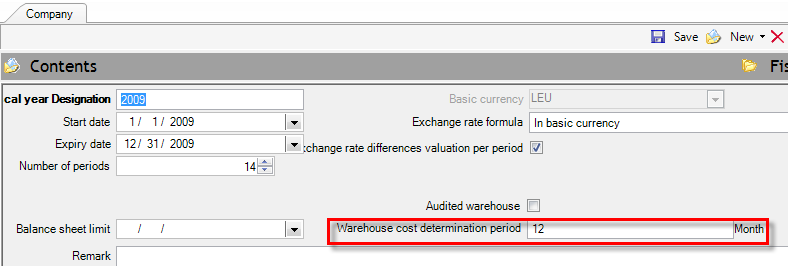
The Inventory period is determined by the starting date of the costing period. Thus, suggesting we had calculated 1st trimester cost, quantity and balance value at the end of 1st trimester is treated as “the cost of starting period balance” for the 2nd trimester. This will be the value that later exports will be valued. HOWEVER IF, every time the costing period starts from the beginning of fiscal year, the calculation performed YTD and the only inventory which is considered to be “acquisition” is the starting period balance of fiscal year.
The ending date of the costing period determines the date of corrective cost entries which derive from the stock valuation process. Consequently, it defines the date that we can have the “agreed balance sheet”.
This element (“costing period” or “weight period” x average price) constitutes the BASIC element of an audited warehouse.
You need to create12 periods when the fiscal year consists of 12 months.
You are obligated in issuing Stock house results only ONCE and at the END of the FISCAL YEAR. If the fiscal year consists of 18 months you should then define 18 periods etc.Create 6 periods when having 6 MONTHS PERIOD RESULTS.
Create 3 periods when having 3 MONTHS PERIOD RESULTS.
Create 1 period when having 1 MONTHS PERIOD RESULTS.
Etc.
The definition of weighted period is not necessarily identified with the time that results are PRINTED (this is because you may have printed the results for INFORMATIVE REASONS, using up to a date values-costs) but it is defined from the sequence VALUE is CHECKED and the stock items PROFIT based on the STOCK VALUATION METHOD and the WEIGHTED PERIOD.
In case of a non audited warehouse, define the number of the standard periods of a fiscal year e.g. 12.
1.4. Acquisitions
“Acquisition” is the transaction that specifies quantity and cost. It occurs from purchases or any other import transaction as for example, stocktaking, production and other import. The total inflows form the acquisitions which are definite and unchallengeable.
1.5. Grants
“Grant” is the transaction which has been extracted from a warehouse either for sale or for any other reason (consumption, preset, distortion).
As long as the stock valuation process hasn’t been completed, grants cost is updated (based on documents parameterization) from the field “cost” of export value documents (e.g. sales, consumptions etch), based on current stock valuation price (spot).
While the stock valuation process takes place and depending on the stock valuation method used, this “temporary” cost is reversed and calculated/entered the new official grant cost. The grant cost entries are calculated and entered automatically and concentrated per item in order for their immediate post to cost accounting, be feasible.
Any finalized export costs such as gratuitous dispenses or from invalid forecasted entries, appear as “differences of cost of goods sold «in column “cost of other exports” via the entries of stock valuation documents CEI.
1.6. Stock Value
For warehouse periodicals the stock item cost is expressed upon value as:
DEBIT VALUE – CREDIT VALUE
This value is updated through the different documents entered daily into the system as well as from documents that have been created from the stock valuation process by having taken into consideration the “official” stock valuation method.
The debit and credit analysis in further factors is:
Debit = Opening Stock Value + Purchases Value + Production Cost + Cost of other imports
Credit = Cost of Sales + Consumption Cost + Gratuitous dispenses cost + Cost of other exports
The analysis of Debit & Credit values in further information is as follows:

The difference between Debit and Credit that results AFTER the process of stock valuation has been completed ensures the known equation of yearend Balance sheet with Gross Result per item:
Stock value = (Opening Stock Value + Acquisition cost) – Grant cost
or
Inventory cost (Debit) (Credit)
1.7. Independent Results
When branches do not have independent results, then, stock valuation is uniformly enhanced for all branches. This means that in the simple case we have let us say; only purchases and sales, these are dealt in total for the item and are not separated in order to derive a different price for one branch and another price for the other branch. The purchases cost independently from which branch has resulted, is being attached to sales and ONE stock valuation price PER ITEM is extracted for the company as a whole.
If a branch has independence results this but must have been indicated (in page “addresses-branches” of company screen):
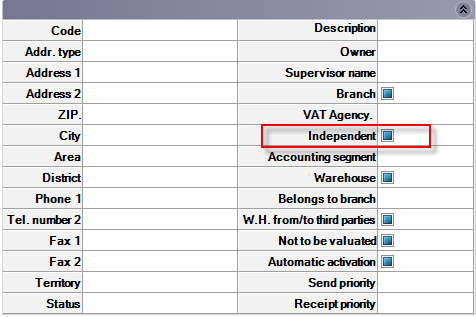
Then, the stock valuation process calculates an independent official cost price for this branch and creates corresponding entries.
Important note: Prerequisite for sound process functioning, Intra-Transfers Notes between Branches/Warehouses MUST be treated as acquisitions. Thus, for the in-house transfer example, it should NOT be used for documents of simple quantitative in-house transfer but the IWI document. (In-house transfer Note – cost of other imports).
Attention: In NO case an independent stock valuation price is extracted per warehouse!
2. Acknowledgments
Items that are simultaneously produced and purchased are not considered as substantial.
Apart from that when these items are consumed, the accounting update is not possible and the creation of additional code is recommended.Clear quantitative transactions without cost update should NOT be considered as a possible scenario, EXCEPT IF it is IN-HOUSE TRANSFER TRANSACTION and concerns NON INDEPENDENT branches.
(Consequently, the imports transferred quantity with the exports transferred quantity, equals).
The program contains documents that could be used for both cases (with or without cost update in imports or exports column), but, when someone changes the default parameterization must take into consideration the abovementioned rule.
3. Entries that will be taken into consideration
The item entries that are taken into consideration in the process are divided into the following categories.
Definite Cost Entries;
Definite Cost Entries for Distributions;
Grants Entries for Cost Determination.
A. Definitive Cost Entries
Are the entries that update BOTH value acquisitions quantity AND acquisition cost. These entries are treated by the process as final and unchallengeable and do not permit further changes. The entries concerning acquisition cost for a certain quantity are considered to carry/include this quantity. This quantity will be used for the accumulation/update of the “Valuated acquisitions quantity”. Such entries are:
Open fiscal year documents
Purchases Invoices – Quantity & Value
Goods Receipt Notes
Goods Return Notes
Production and Assembly Notes as well as
Surpluses or other Note Corrective entries – Quantity & Value.
B. Definitive Cost Entries for Distributions
These are entries that update ONLY acquisition cost. The process faces these entries as distributive. For FiFo – LiFo - Floating Cost Price stock valuation methods, the distribution enables for the REAL COST estimation of each acquisition whereas as far as the Average Cost Price these entries just influences the Cost Price, without distribution to be necessary for one by one acquisition. Such transactions are:
Purchases Debit Notes (supplementary charge invoices)
Discount Credit Note for purchases or Turnover Credit Notes
The information of Reference Date Range appears in the “Status” page of documents. When these fields have been fulfilled then the information will be taken into account in distribution. If there are monthly or trimester results it would be better forecast credit documents (provisions) to be entered.
C. Grants Entries for Cost Determination
These are entries that update quantity AND value or/and cost (invoiced) sales, self-dispenses, consumptions or other exports. When these entries are entered, the real cost is unknown and in this case the cost update only exists with a “temporary” meaning, in order for the management accounting information to be enhanced. So, the process VALUING COST (to field “valuated cost”), while at the same time, create grants cost temporary reversal and final recognition documents (e.g. documents CBV).
Such transactions are:
Sales Invoices - Quantity & Value
Retail Notes
Delivery Notes
Return Notes
Consumptions Notes
Self-dispense Notes, as well as
Other output Notes.
Note: Any transaction related to a warehouse that is “Not Valued” will not be taken into account.
4. Stock Valuation Process
4.1. Call method
The process is called from Periodic Processes/End of period processes/Stock valuation and presents the following dialog:
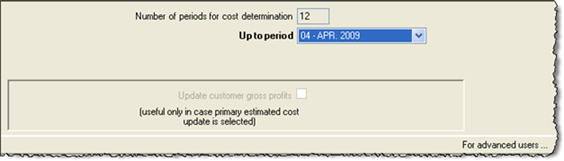
Number of periods for cost determination: Is determined from the volume of accounting periods of an “inventory cost determination period”- field in “Fiscal Year” screen and it cannot be changed in this dialog. In our example we have annual cost accounting.
Up to period: Defines the last accounting period up to which it will be performed. If there is a monthly or three months costing period, cost estimation will commence from the beginning of the costing period (e.g. beginning of trimester), whereas if there is an annual costing period, calculation process starts from the beginning of fiscal year.
Update customer gross profit: Customers gross profit which is available at periodic customer’s data is possible to be updated with the definite value after stock valuation, ONLY when the temporary (spot) and the definite cost are NOT separately followed (by activating the general parameter “Update primary estimated grant cost information”), but the temporary cost is been replaced in documents with the final cost. In this case by activating this parameter, customers’ entries included in documents that have the proper Update profile, are recalculated as well.
It should be pointed out that the control of gross profit that is enhanced from Profitability reports of menu “business snapshot”, as well as the reports “Items sales per customer” does NOT use this information, but the one that arises from the proper updated items entries. The cost presented to customers periodically is used ONLY in “Sales Statistics” from the menu Accounts receivable.
Since this update process slows down the stock valuation process, an autonomic possibility of undertaking the stock valuation process is provided via the process “Update Customer Gross Profits” in the current Stock Valuation menu.
4.2. Stock Valuation documents management
By selecting the Beginning of stock valuation process, IF for the same cost determination period, cost valuation has been completed before, a dialog box is presented. In this dialog box is defined whether the process will continue with the Cancellation or Deletion of the documents earlier produced by stock valuation.
This screen is presented ONLY if the general parameter named “09 - Question of the Begging of process to delete or cancel interim results” has the value “True”.
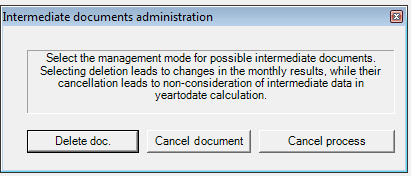
Documents “Deletion” is proper to be used when a mistake has already happened or a later interjection of transactions has occurred and for this reason we seek the alteration of the last stock valuation illustration.
Documents “Cancelling” is more suitable to be used when it is required the last warehouse illustration created by the stock valuation process, to remain unchanged and any changes to appear to the next period (for which stock valuation is undertaken). Stock valuation DOES NOT DEGRADE the illustration of dates prior to estimation date. The differences from the prior period are presented in the current period.
Note: When the parameter “Updating primary estimated grant cost information” is activated then, in both cases of documents cancelation or deletion occurred for previous months, cost is degraded as it uses the value estimated for the WHOLE COSTING PERIOD and is not shaped through stock valuation documents. Thus, when the columns “cost” and “gross result” are printed in the monthly Warehouse Inventory report, you will NOT be able to have an identical report after another stock valuation process runs for a next period.
4.3. The process step by step
Defining acquisition cost,
Defining & updating cost valuation prices (back to 1st step),
Allocating cost to grants*,
Creation of cost documents.
*) For FiFo, Lifo, Weighted Average stock valuation methods, the following process is required In these methods acquisition cost must be firstly attached to existing grants. Stock valuation price is calculated through the remaining acquisitions. For this reason stock valuation’s steps order is being reformed. Note: The accounting notes for cost update, that produce item entries which will further update monthly results (trial balances, registers) of every item. Any execution may be canceled and repeated if errors are detected. |
|---|
4.3.1. Defining acquisition cost
It calculates the quantity and the cost of “starting” in the beginning of the costing period in which the “period of calculation” belongs.
When the stock valuation method used is FIFO or LIFO, it allocates the acquisition value of cost entries for distribution. (Discount Credit Notes and Debit Notes).
When the stock valuation method used is FIFO or LIFO, matches in a quantitative way the negative (Credit Notes) with positive entries (invoices), in order the cost from “real cost evaluated acquisitions” to be estimated.
4.3.2. Defining & updating cost valuation prices
Defines the acquisition cost and shapes though it the “valuated cost” of all grant transactions (depending on the stock valuation method) of C type transactions and to the lines of related documents FOR ALL THE ITEMS are not PRODUCED ITEMS. Accordingly, updates in ALL item periodicals the stock valuation PRICES FIELDS with the maximum accuracy.
Market cost price is defined by the user into the item’s site. The stock valuation process compares the resulting official stock valuation price with the item’s “market” price. When this value is smaller and not zero(**), is replaced.
Desirable cost price. It works as the market price but when the abovementioned condition** is not in effect.
4.3.3. Allocating cost to grants
It reverses the spot grants cost per grants category, concentrative, per item and independent branch.
It reverses grants cost documents of the previous period.
4.3.4. Creation of cost documents
It produces grand cost documents per grants category, concentrative, per item and independent branch.
It calculates and re-updates compositions cost (based on consumption cost of raw materials that has already been degraded in previous step.
Proceeds to Production Cost Valuation Process in cycles of semi-finished and final products.
Proceeds to Bonded W/H Cost Valuation Process (estimates and re-update the Bonded W/H costing folder, based on export cost of raw materials that has already been degraded in previous step).
Note: Case of incapability valuing grant cost! When no purchase/acquisition/inventory value occurred from which the relevant cost can derive in order for a grant to be valued, such as, the sale return from sale of previous fiscal year, the process uses the “Standard Cost” into which someone may insert the final acquisition cost of previous fiscal year.
4.3. Cost difference entries
All the below mentioned cost difference entries REQUIRE THE EXAMINATION of the items included into cost difference documents produced (via the scroller “stock valuation documents”) since there is a possibility of WRONG ENTRIES. (Small differences regarding the rounding should be ignored).
See CEI documents.
- It produces entries of stock valuation price differences for every item (in column “debit” or “Cost of other imports”) by checking if:
Debit – Credit = Acquisition cost - Grants cost
Thus, any transaction occurred using a not proper document (“acquisition” that did not update the Debit or “Grants” that did not update the Credit) as well as any values ignored due to step 6 where a quantity was entered with a value that later was extracted with another value, are detected and entered as debit or credit stock valuation differences. The produced documents are CDD & CDC.
Relevant control for the agreement of compositions cost and the consumptions cost is undertaken and via documents CDA & DAC the compositions cost is being corrected. (Compositions cost should not be updated through any documents except of “assembly” since it is being correctly calculated only from stock valuation and before the cost evaluation process of their components. (see above step 8).
- It produces entries of grants cost differences for every item (in column “credit” or “cost of other exports”) by checking if
Debit – Credit = Inventory balance * Official Cost Price
Thus, any differences in self-dispenses cost or forecast values or rounding errors or other similar cases (usually occurred from the comparison between the Official value and the result from the aforementioned equation) are specified and entered into the CEI document. All the reasons provoking differences and can fatherly be detected, are presented in the “remark” field with the following coding:
01 Negative stock value
02 Zero quantity with non zero stock value
03 Corrections of self-dispenses cost
04 Corrections of other exports cost
07 Other reasons
Because of the special layout “199” are visible and easily detected:
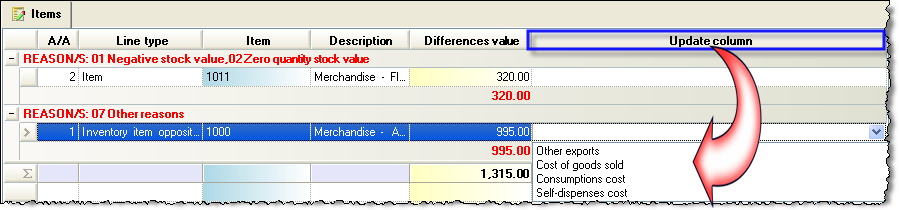
In this document the user can choose the column of Trial Balance that he wishes to be updated through the column named “Update column”. The column of “Other exports” is by default updated (or if the specific field remains empty). Otherwise, the user can modify the column by selecting one of the below options. “Cost of goods sold”, “Consumption cost”, “Cost of goods sold” or “Self-dispensedes cost”.
If we want the COST OF GOODS SOLD to be always updating, then you need to change the Update Profile of the document. The Update profile could be used as “4421P” instead of “4421”.
Attention! By NOT updating the column named “Other exports”, someone may avoid the appearance of these amounts to Official Trial Balances by using this functionality. However, it is of great importance to examine ALL the differences in the CEI document, and where necessary the user will need to go through corrections or even to undertake the Stock Valuation process again. The only exception is the case having small rounding differences such as 0,01 where it would not occur any problem.
Notes:
The process of Stock Valuation is undertaken for the selected method of stock valuation of any kind with the exception of the [Average Cost Price] that is always calculated and is available for all the types, independently of the stock valuation method used. Thus, those who use the FiFo method have the Average Price method also at their disposal whereas in reverse is not in effect.
If the resulting official cost price that results is 0 (for example the process begins with null “inventory” and there is not any purchase entries), the Stock Market Price of the nearest previous period is taken into account. In case it is zero, the standard cost price of the nearest previous period is taken into account. (It is updated from the user but from the Fiscal year closing as well). In this way returning sales from the previous fiscal year can be properly treated.
5. Update the customer’s Gross Profit
Customer’s gross profit that is available in periodicals is possible to be updated with the definite value after stock valuation ONLY when the spot and final cost ARE NOT separately attended (by choice from general parameter “Updating primary estimated grant cost estimation” but when the estimated (spot) cost is replaced with the final.
In this case, the process can be carried out through which customers’ entries in all documents (performing this type of update) are re-updated. You may call this type of update AND through stock valuation dialog. It will be a DELAY ON THE TIME OF PROCESS EXECUTION.
It should be pointed out that the control of gross profit achieved through Profitability reports called from menu “Business Snapshot” as well as “Items Sales Per Customer” Does NOT use this information but the one occurs from properly updated items entries. The cost from customers periodically is ONLY used in the “Sales statistics” report called from menu Account receivable.
6. Examination & Detection or problems
We suggest you use the reports presented in menu “End of Period Processes/Stock Valuation”:
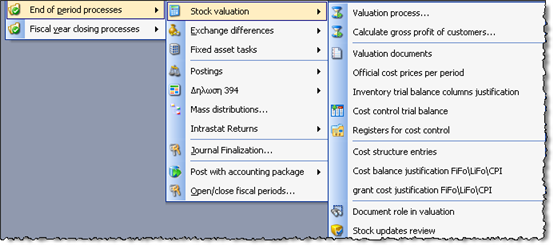
6.1. Official cost price per period
The following report presents in summary the official cost price per item and the configuration of stock value based on this price. There is an option of having the report presented with “Period Analysis” which is the default report layout AND the “Period Cost Price” can be checked. The period price will differ from the official cost price in usual cases that the costing period IS NOT MONTHLY (is not identified with the accounting period). Stock valuation is then MAINTAINS the estimated per accounting period of official cost price that defined the earlier inventory results while it updates the “official price” for all months in order for someone to be able to take results with any of the 2 prices by using the appropriate parameter.
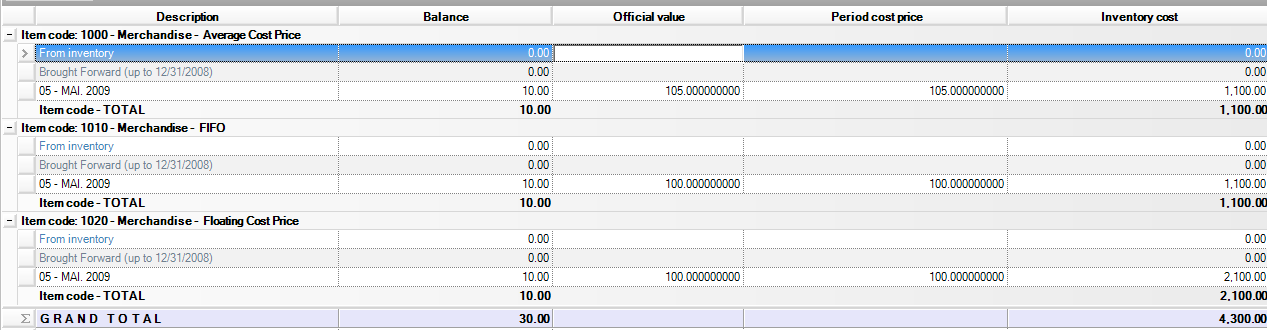
6.2. Compare official cost price
In the same menu you may check the AMOUNT official cost price CHANGED between the two sequential periods. If the cost change is big (not expected), someone may for example, observe mistakes or possible elliptic purchases entries (Is presented with grouping per customer helping in finding invoices that contain wrong values):

6.3. Cost estimation transactions
With this report someone may check all the transactions “responsible” for cost estimation and observe possible deficiencies or entries mistakes or provide reasoning as for the estimated cost, for any period of time. The transactions are of A, B or C category and are based on the categorization given in chapter “Entries that will be taken into consideration”.
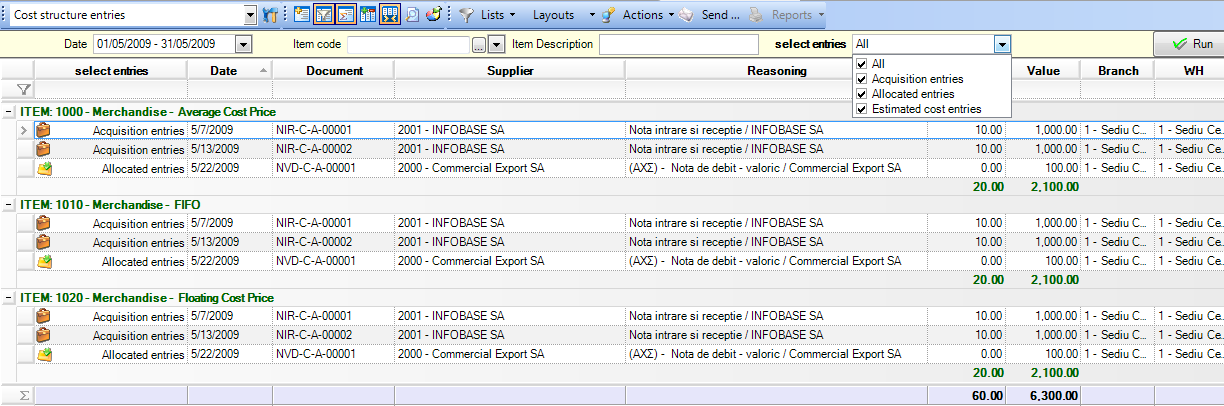
6.4. Balance Justification
By using this report you may overall analyze and check WHICH DOCUMENTS HAVE UPDATED WHICH BALANCE COLUMN, and seek out not only stock evaluation results but overall the transactions occurred (purchases, sales, transfers, credit documents).
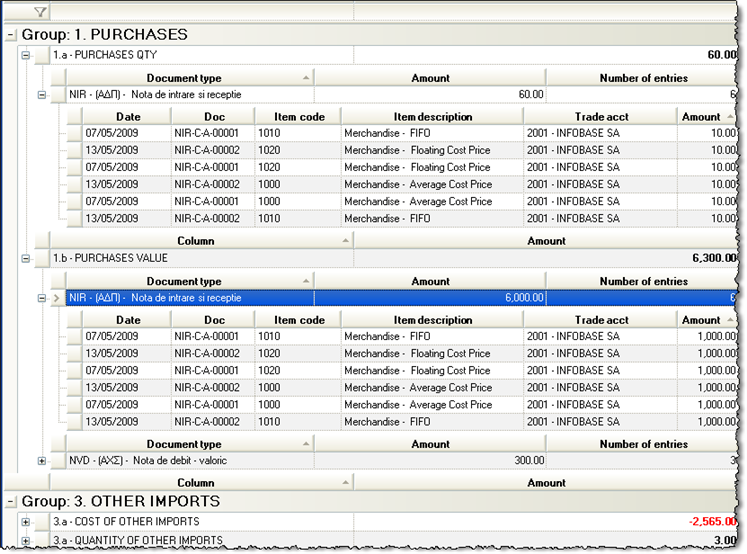
By using second level cascade analysis you may reach the particular document lines.
Especially for items using FiFo/LiFo as stock valuation method or the Average Price method or Floating Cost Price, Stock Valuation process PARTICULAR MATCHING between acquisitions (purchases) and grants (sales). The following scrollers justify the inventory cost (from NOT allocated into sales cost) and also the cost of goods sold (from purchases matching to each salesperson).
6.5. Justification Of Inventory Cost
This scroller presents quantity and stock columns that give the initial values, the values available for grants, the values shared to grants. Balance cost is justified as such.

Columns “Cost allocated to Grants” and “Inventory Cost” agree with “Cost of Goods Sold” & the “Balance Cost” respectively:

6.6. Justification of Grants Cost
This scroller presents all grant transactions per item (sales, Consumptions κλπ.) that were processed from stock valuation with the attached cost. This cost AGREE with COST OF SALES. In case of Production and depending on the grand type, cost will agree with the corresponding exports cost of Detail Trial Balance, per item:

Note: The last two options concern exclusively cases where the stock valuation method is FiFo/LiFo or FCP. The activation of Stock Valuation results reporting is enhanced via the general parameter “Save Valuated Cost Allocation”.

7. Results – Agreements
7.1. Inventory Register Records
Stock Valuation results are presented in the official or informative reports depending on the time and criteria chosen:
Monthly warehouse inventory
Ending inventory trial balance
Registers (inventory records)
7.2. Presuppositions of Accounting Agreement
The inventory records offer some totals per month which should come into agreement with suitable accounts of accounting or/cost accounting IF:
The entries must have been checked in relation to ‘existed’ documents.
The parameterization of an accounting post is correct and posting completed without errors.
The process of stock valuation for this particular period has been completed and examined using the provided tools.
We choose the RIGHT and CORRESPONDING CRITERIA in the relevant reports.
7.3. Commercial Agreement
Another type of agreement after stock valuation is the
COMMERCIAL AGREEMENT => WAREHOUSE– CUSTOMERS - SALESPERSONS.
In order to make this agreement, use:
Business snapshot (turnover & gross profit)
Stock balance sheet (turnover & gross results)
Sales statistic per Salesperson (turnover)
Item sales per Customer (turnover)
Revenues Account Balance (credit-debit)
8. Working with independent branches
In the following we will present the steps to be followed so that the quantitative-value stock balance can be extracted by branches and warehouses. The functionality described below requires that existing branches are already marked as independent.
8.1. Overview
The calculation of the export cost is done at company level or by branches if they are marked as independent.
Valuation documents are generated on a branch-by-branch basis but the cost allocated to exports differs depending on whether or not the branches are marked independent.
If you do not work with independent branches, the cost allocated to exports is done:
- for the FIFO method: in order of exit, regardless from which branch
or
- for CMP method: per company - regardless of branch
Documentele de evaluare cele mai frecvente sunt:
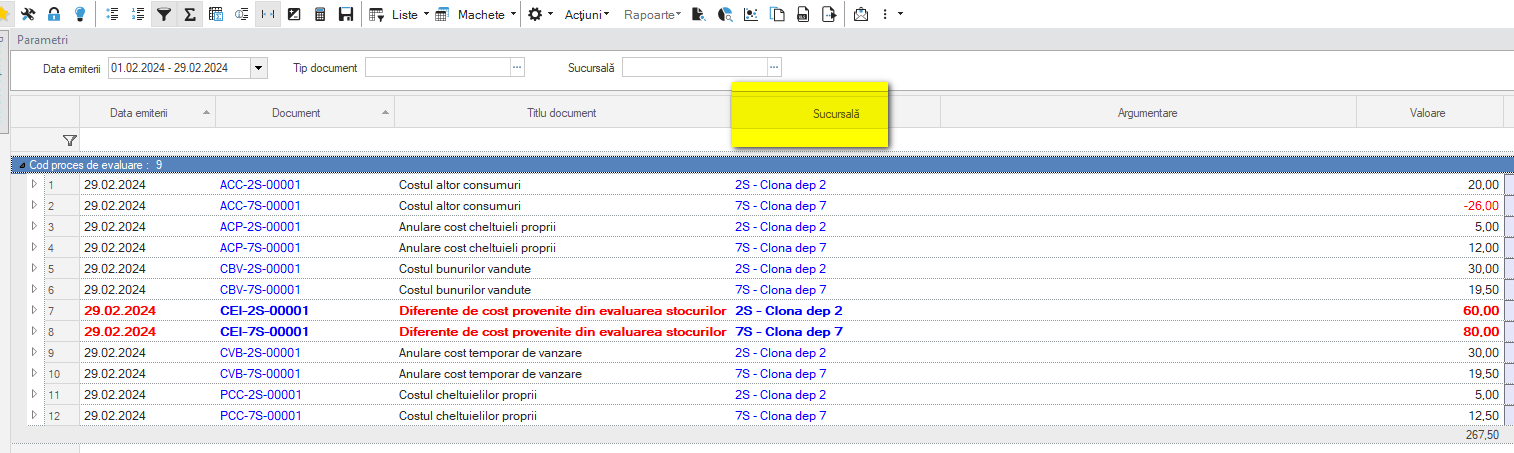
CBV – Cost of goods sold (in correspondence with documents such as AEV, FAV, NVK)
ACC – Cost of other exports (corresponding to documents such as CEC, DIF, NND)
PCC – Cost of self-deliveries (corresponding to BCI)
CCN – Cost of consumption (in correspondence with documents such as NFC, NPC, COP)
CEI – Cost adjustment (no document in correspondence)
8.2. Settings
Branches
All existing branches will be marked as Independent.
This ensures that the stock valuation results for each branch are not influenced by import or export transactions from other branches.
Warehouses
A “clone” in the form of Branches and warehouses will be created for each warehouse.
It must have the following characteristics:
It is marked as branch only
Is marked as independent
The suggestion for coding it is to have the same prefix as the original warehouse.
In the menu Tools and Configuration > Customize… > General > Companies/Branches/Fiscal Years
tab:

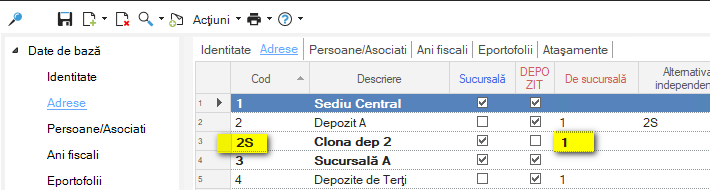
Once these “clones” have been created, the newly created branch will be attached to each of the original warehouses.
The field where this will be marked is Independent alternative.

Also, newly created branches will be attached to the same branch as the warehouses for which they were created.
Journal Codes
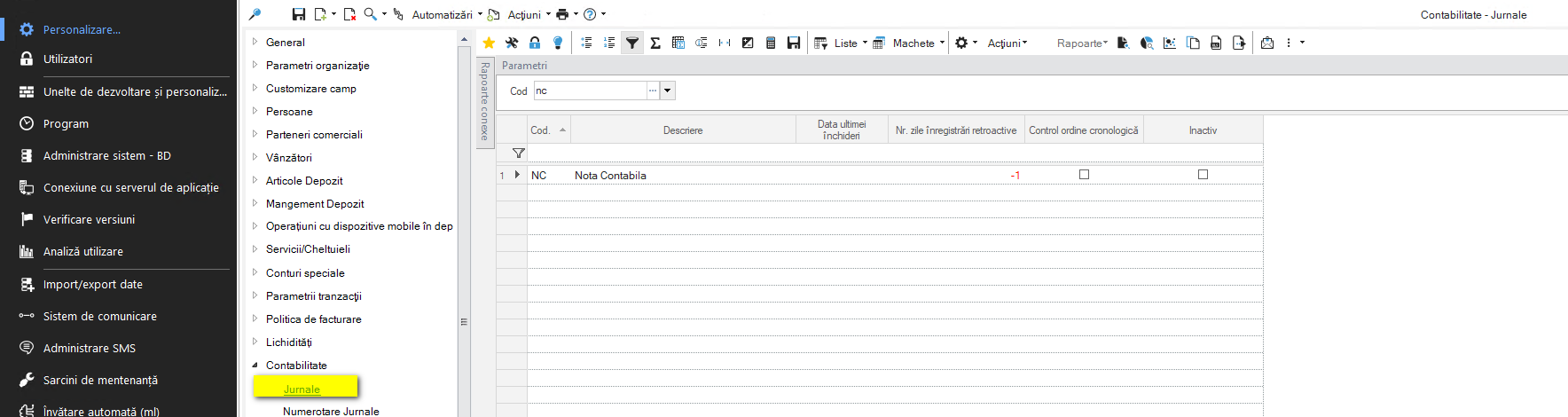
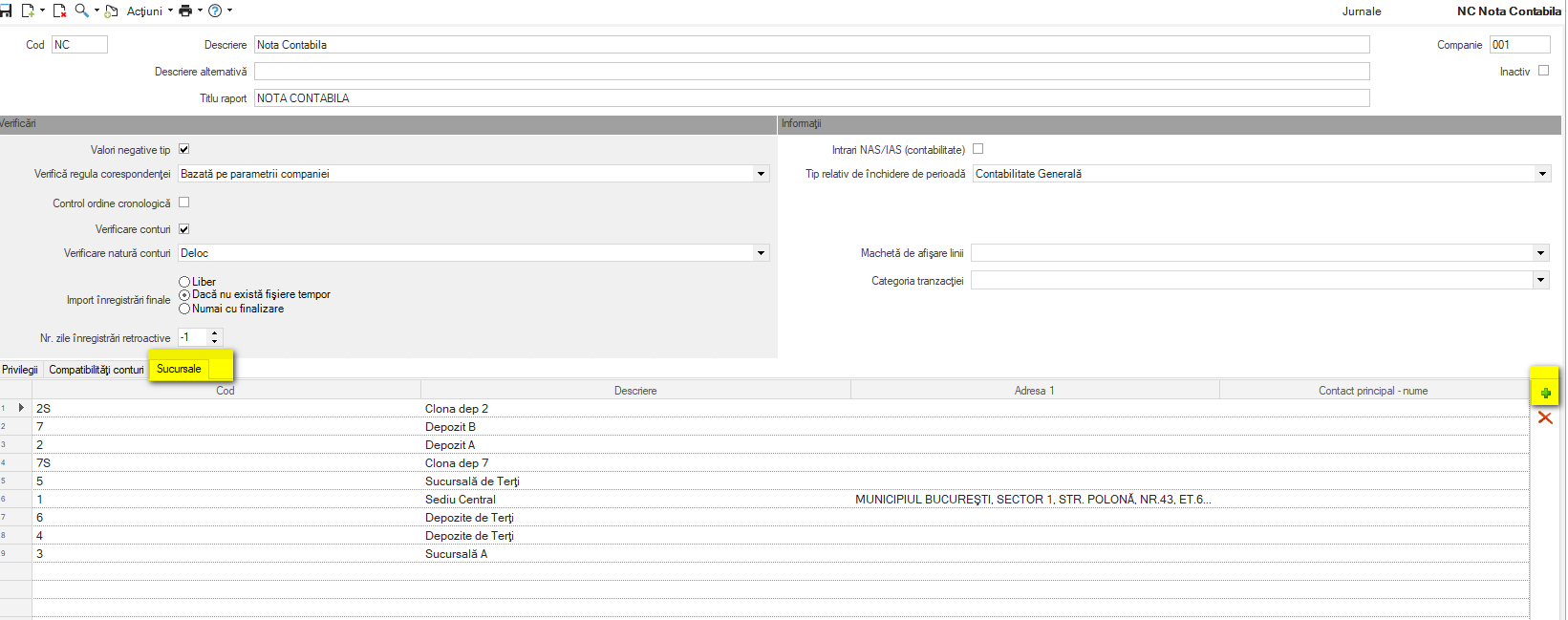
It is necessary to attach the new branches defined above to the journal codes, which are mandatory fields for any accounting document.
The menu path is: Configuration and Tools > Customize > Accounting > Journals.
On each journal code, select all branches from the Branches tab.
Posting documents
All documents which have an accounting model and which involve stock transactions will take over the alternative branch related to the warehouse in the accounting post.
It is only the amount related to the line items.

8.3. Stock valuation
From the user point of view, the evaluation process runs as before.
The change concerns the way in which valuation documents are generated.
Until now, valuation documents were generated per branch and type of operation. The warehouse was not relevant and one belonging to the branch was randomly filled in. Thus, a stock balance could only be run per branch so that the values were correct.
The new mechanism generates valuation documents on each alternative branch.
Thus, the official cost is indirectly allocated to each warehouse.
8.4. Reports
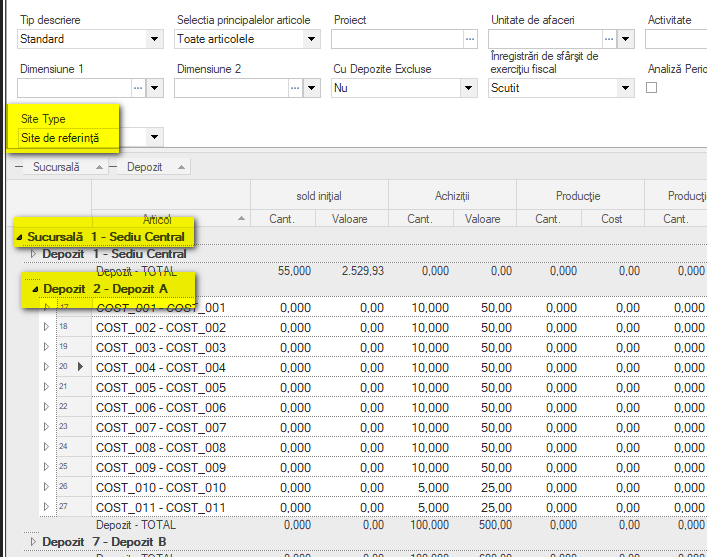
In reports a new parameter Site type has been added. It refers to the branch that will be displayed in the report.
It has 2 possible values:
Entry
Reference site
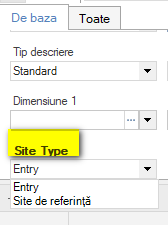
Option Entry will bring the amounts according to the alternative branch.
Option Reference Site will bring the amounts grouped by the main (official) branch of the warehouse.
Stock balances
Stock balances can be run with grouping by warehouse:
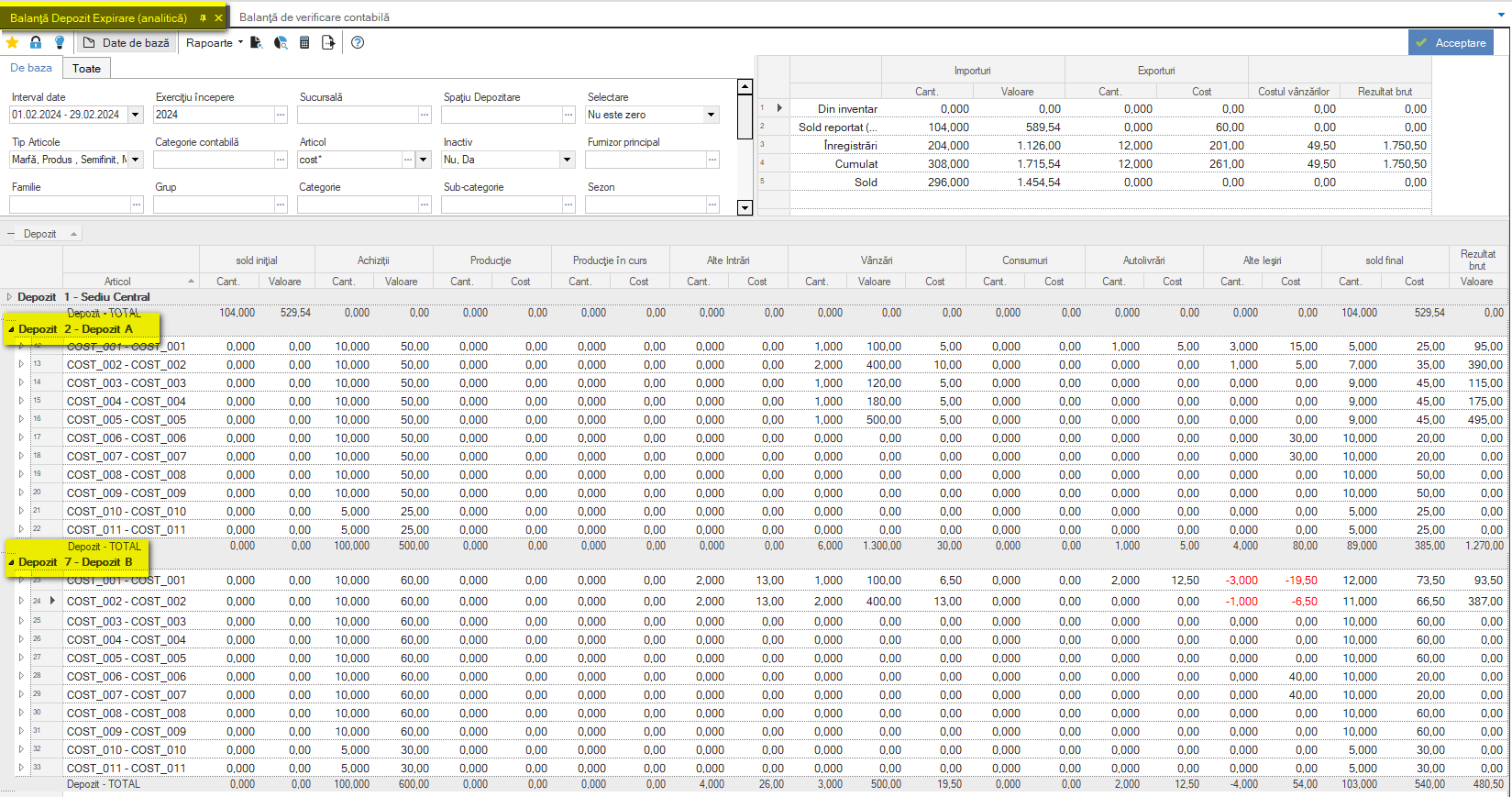
Regarding the branch:
- If you choose Site Type = Entry, the branch displayed will be the newly created (alternative) one,
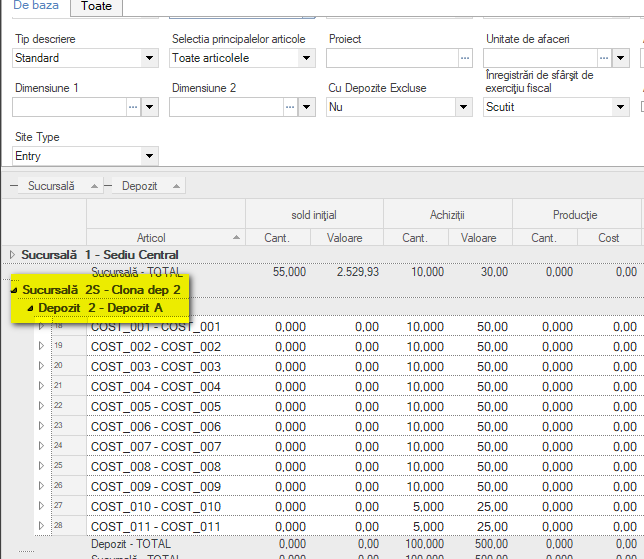
- If Site Type = Reference Site is chosen, the branch displayed will be the main branch.
Register report
Any Item Register report can be run on the warehouse.
The branch display functionality is identical to that described for the stock balance.
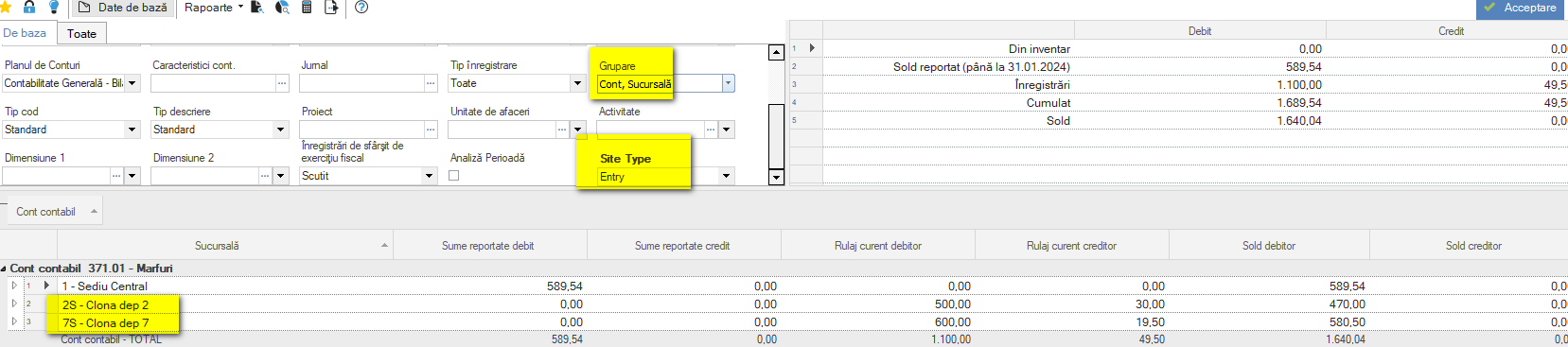
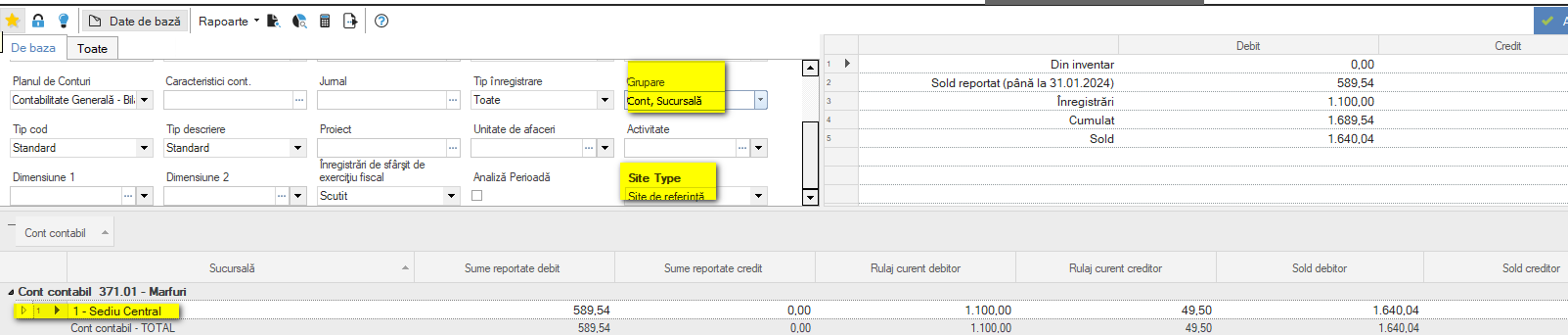
Trial balance sheet
In the case of stock accounts, the trial balance can be run on both the alternative and the main branch. This makes the reconciliation mechanism with the stock balance easier as the alternative branch is linked to a single warehouse.
- With alternative branch:
- With main branch:
9. Stock valuation parameterization
(New chapter, soon.)
10. Performance considerations
(New chapter, soon.)