Configurations for new VAT rates 1.1. Creation of new VAT analytical accounts For VAT accounts - 4426, 4427, 4428, new codes will be defined with suffix:
for the rate of 21%: .06 - 4426.06, 4427.06 and 4428.06;
for the rate of 11%: .07 - 4426.07, 4427.07, and 4428.07.
{class=“children children-type-tree children-sort-weight”}
Subsections of Finance & Accounting
The new VAT rates
1. Configurations for new VAT rates
1.1. Creation of new VAT analytical accounts
For VAT accounts - 4426, 4427, 4428, new codes will be defined with suffix:
for the rate of 21%: .06 - 4426.06, 4427.06 and 4428.06;
for the rate of 11%: .07 - 4426.07, 4427.07, and 4428.07.
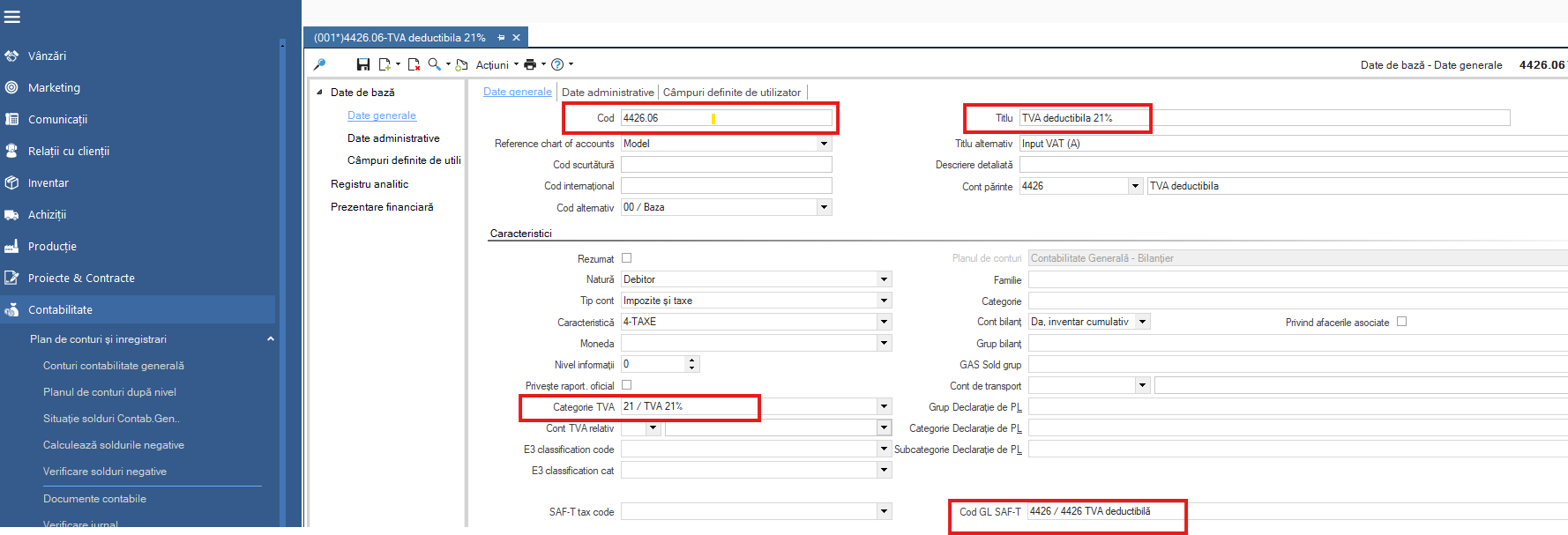
Fields to be completed:
Code;
Name;
VAT category;
SAFT Code.
For example:
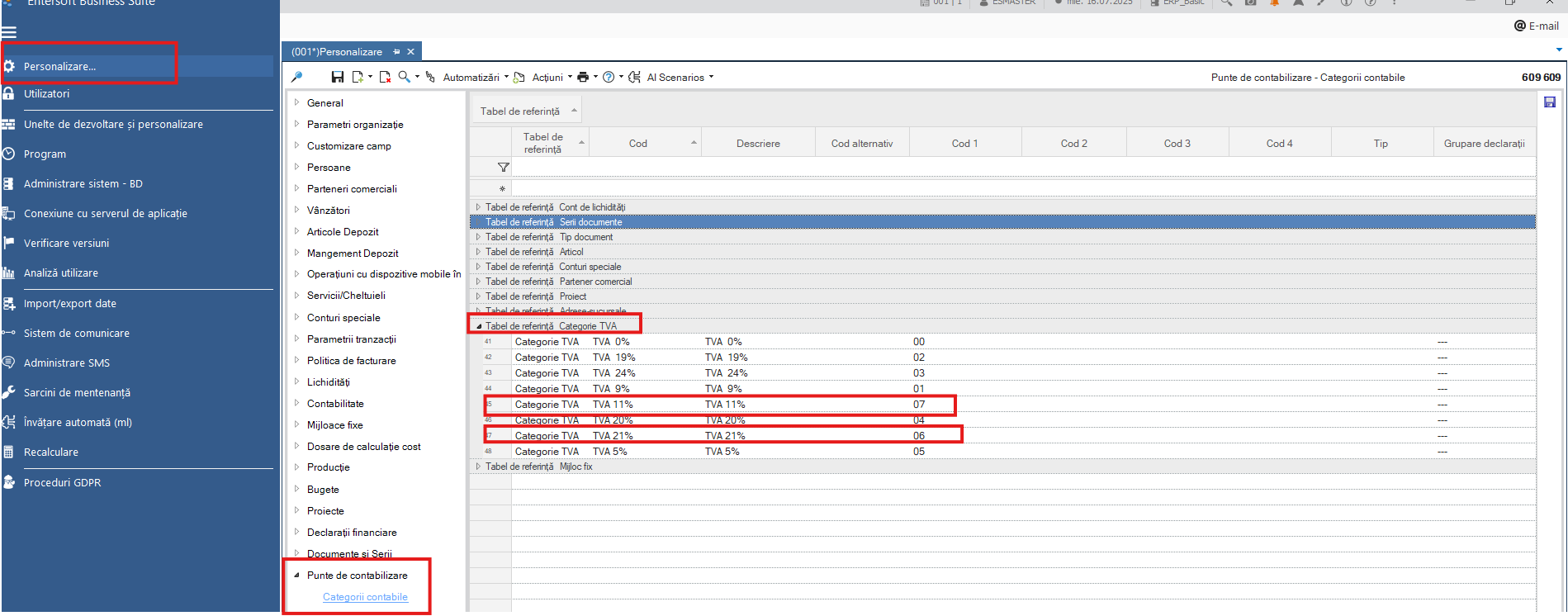
1.2. Creation of VAT accounting categories
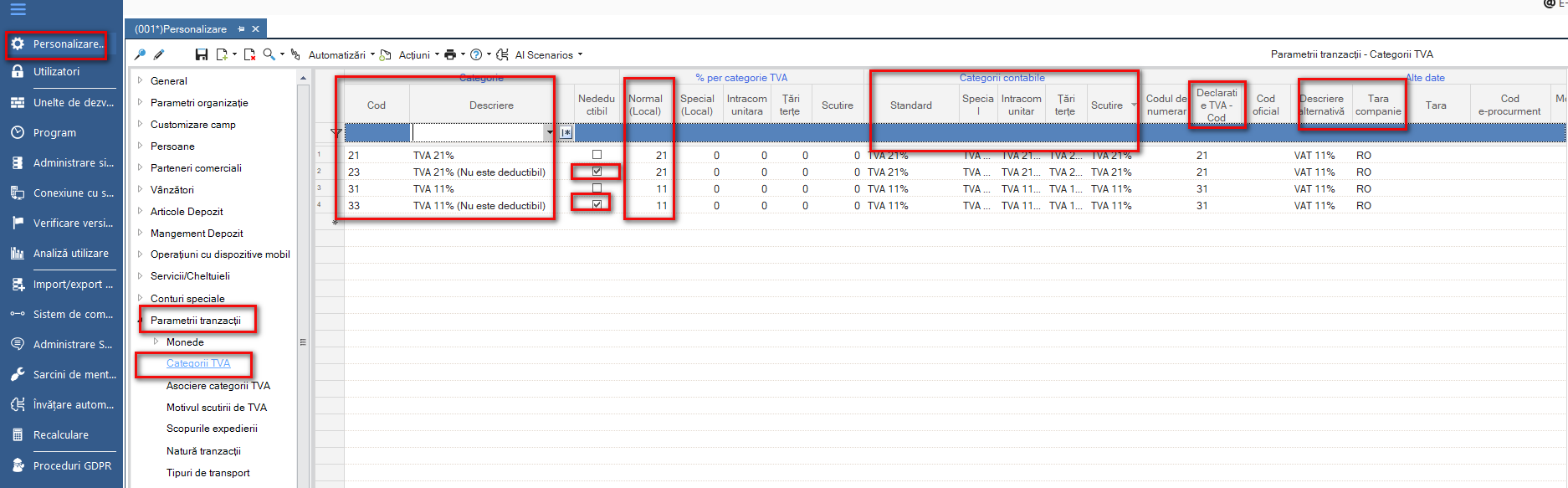
1.3. Creation of new category of VAT (deductible and non-deductible)
21: VAT 21% deductible;
23: VAT 21% non-deductible;
31: VAT 11% deductible;
33: VAT 11% non-deductible.
Attention: For customers with a common multi-country database (RO/GR/BG) it is necessary to use the prefix or suffix RO (following the existing VAT categories model).
For example: RO_1 is for 19% and for 21% the model will be RO_21.
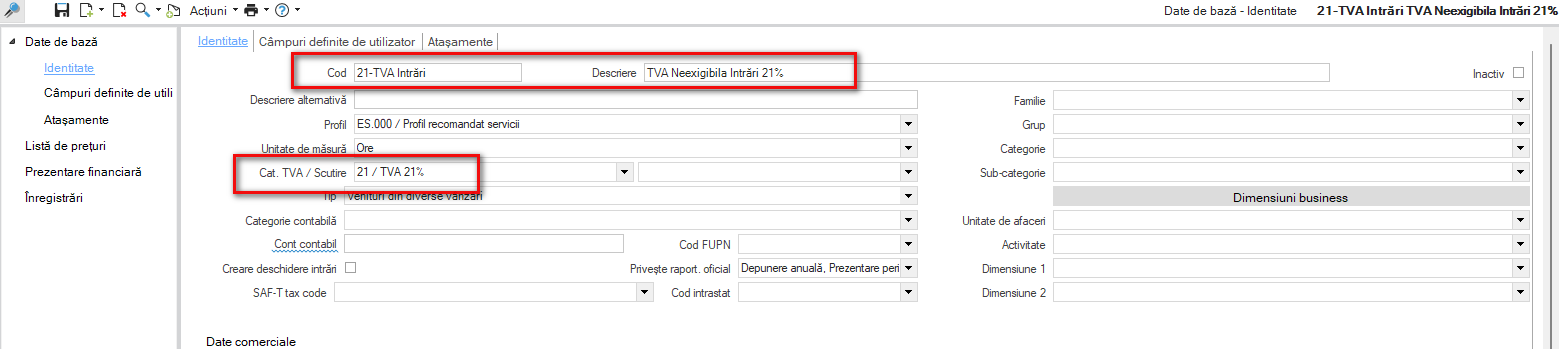
1.4. Creation of generic items for non-exempt VAT
In the area of Expenses 2 items will be defined according to the following model, e.g.: 21-OutflowVAT.
In the Services area 2 articles will be defined according to the following model, e.g.: 21-InflowVAT.
Important: The previous steps (Chapters 1.1.-1.4.) can be done at any time. Subsequent steps will be done before the first transaction on August 1, 2025.
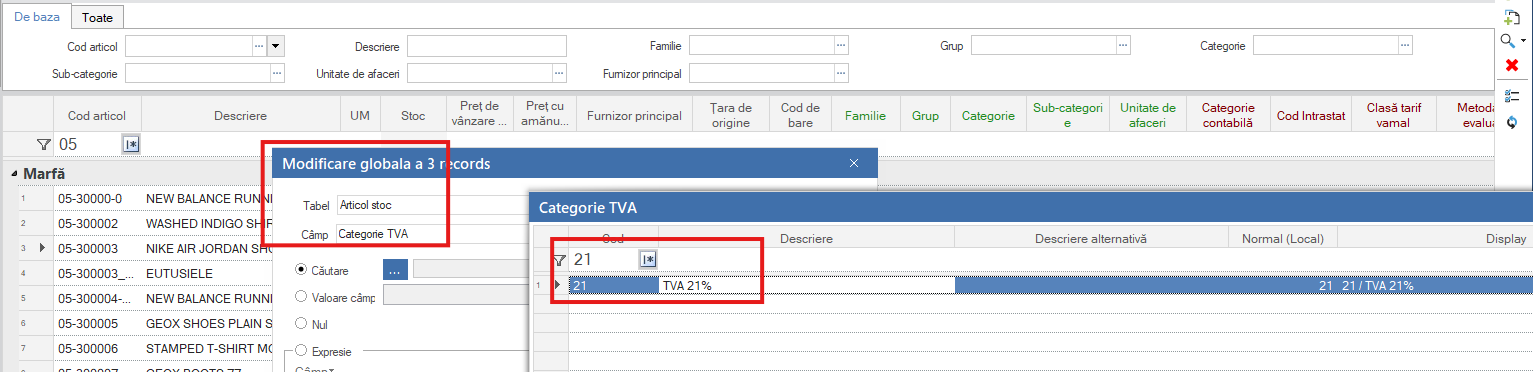
1.5. Global change of VAT category items
Before starting the invoicing for the following month, a global change of the VAT category of the items shall be made. In Inventory > Inventory Items > Items select the items for which the VAT rate needs to be changed and from Actions > Global Change select the field VAT Category.
This must also be done for generic items of type Expense or Service.
1.6. The following transitions need to be monitored:
From customer order to the delivery note: whether or not the VAT category is taken from the line;
From delivery note to invoice: whether or not to take the VAT category from the line;
Rebook/return: the original VAT category must be kept;
From Supplier Order to receipt;
From Purchase Receipt to Purchase Invoice;
Cancellation/return;
Note: for orders remaining open at the end of the day on 31.07 we recommend that you make a mass change on the items to the new rates. Using the Sales > Detailed Unfilled Orders and Purchases > Detailed Forecast Orders scrollers you can identify the open orders.
Also, in Inventory > Warehouse Items > Items - the related reports below allow you to globally modify order type documents so that the VAT rate in the document lines is the one on the item card.
Sales document lines for global modification;
Purchase document lines for global change.
1.7. Documents registered for the previous period
The documents recorded for the previous period must be manually recorded/modified in lines for the VAT rate.
For example, recording an expense, energy invoice for the month of July, will be modified in the line of the document with the previous rate, because the energy item already has the new rate.
1.8. Updating price lists
In cases where retail price lists (VAT included) are used, they need to be updated.
1.9. Monitoring possible integrations with third-party systems
It is recommended to spot-check how the documents generated by the automated processes pick up the correct VAT rate. Usually, the current VAT rate set at item level is picked up, but there might be exceptions.
1.10. VAT rate settings at cash register level
If working with cash registers, they will be set separately with the new VAT rates.
2. Hotfixes and further in-app developments
In order to start using the new VAT rates as of their effective date - 1.08.2025, Hotfixes have been created for all versions currently in use by our customers, starting from 5.9.0.0 to the latest recently released - 5.12.0.4.
2.1. New parameters in the Accounting Segment section
Two parameters for the sales flow (corresponding to each quota) and two parameters for the purchases flow related to VAT input transactions.
For each parameter the corresponding generic items (defined in step 1.4) will be set.
These are presented in the table below:
Parameter code
Parameter name
Generic article code
Explanation
VAT_PAYMENT_ITEM_SALES_STANDARD_CATEGORY
VAT on payment scheme: VAT on payment Article (standard rate from 01.08.2025)
21-InflowVAT
VAT_PAYMENT_ITEM_PURCHASES_STANDARD_CATEGORY
VAT on payment scheme: VAT on payment Article (standard rate from 01.08.2025)
21-OutflowVAT
VAT_PAYMENT_ITEM_SALES_REDUCED_CATEGORY
VAT on payment scheme: VAT on payment Article (reduced rate from 01.08.2025)
11-InflowVAT
VAT_PAYMENT_ITEM_PURCHASES_REDUCED_CATEGORY
VAT on payment scheme: VAT on payment Article (reduced rate from 01.08.2025)
11-OutflowVAT
2.2. Updates to flows for VAT on payment
All flows involving VAT on payment have also been updated.
Thus:
The scrollers have been updated to cover VAT payments on payment at the new rates. The scrollers are used when searching for invoices with VAT on payment on documents of type:
DPV – Supplier payment,
DPE – Issue bills to suppliers,
ICT – Collection (from customers),
ICE – Receive bills from customers,
CPB – Partner account offsets (debit),
CPT – Partner account offsets (credit).
The Pending Documents scroller has been updated to also display invoices with VAT on payment containing the new VAT rates.
The automation of Reverse Charge Document Creation (TXV) now also covers the new VAT rates.
The BR (Business Rule) applicable to AMV/AMP documents – BO/CEC payment/collection with VAT on payment has also been updated. When selecting a BO/CEC, the related invoices must be completed automatically.
2.3. Amendments for D300 Declaration
A new version 5.12.0.7 has been released, which includes changes to the application to enable the generation of the D300 declaration for August 2025 and subsequent months. Detailed information is provided in both the Instructions for completing the D300 declaration - Chapter 12 and the Release Notes for 5.12.0.7.
__________________
Note: For the following sub-chapters we are waiting for the specifications from ANAF, so that the August declarations, to be submitted at the end of September, will also include the new quotas introduced.